MLGraph API Documentation
Complete API reference for MLGraph's distributed vector database. Choose between REST for web integration or gRPC for high-performance applications.
API Architecture
Endpoint Structure
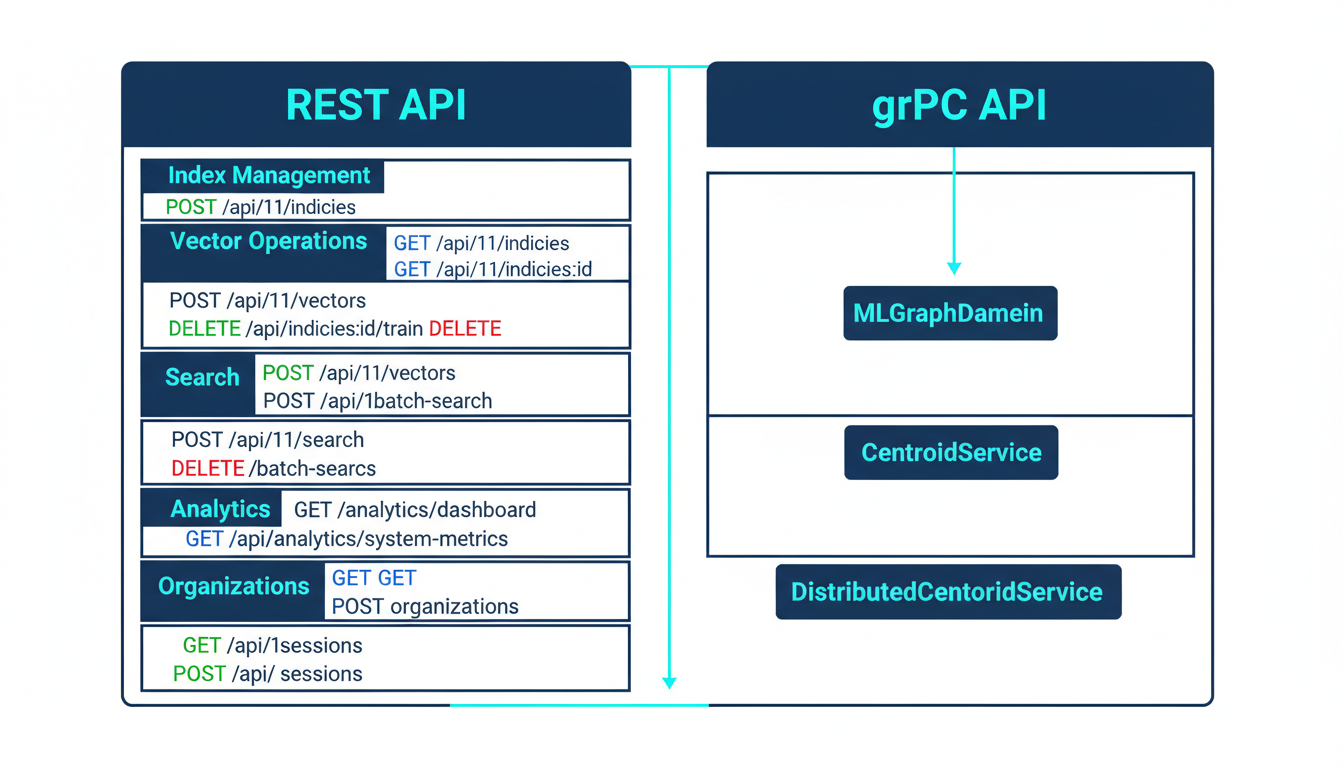
MLGraph provides both REST and gRPC APIs organized by functional domain: index management, vector operations, search, analytics, and authentication.
Request/Response Flow
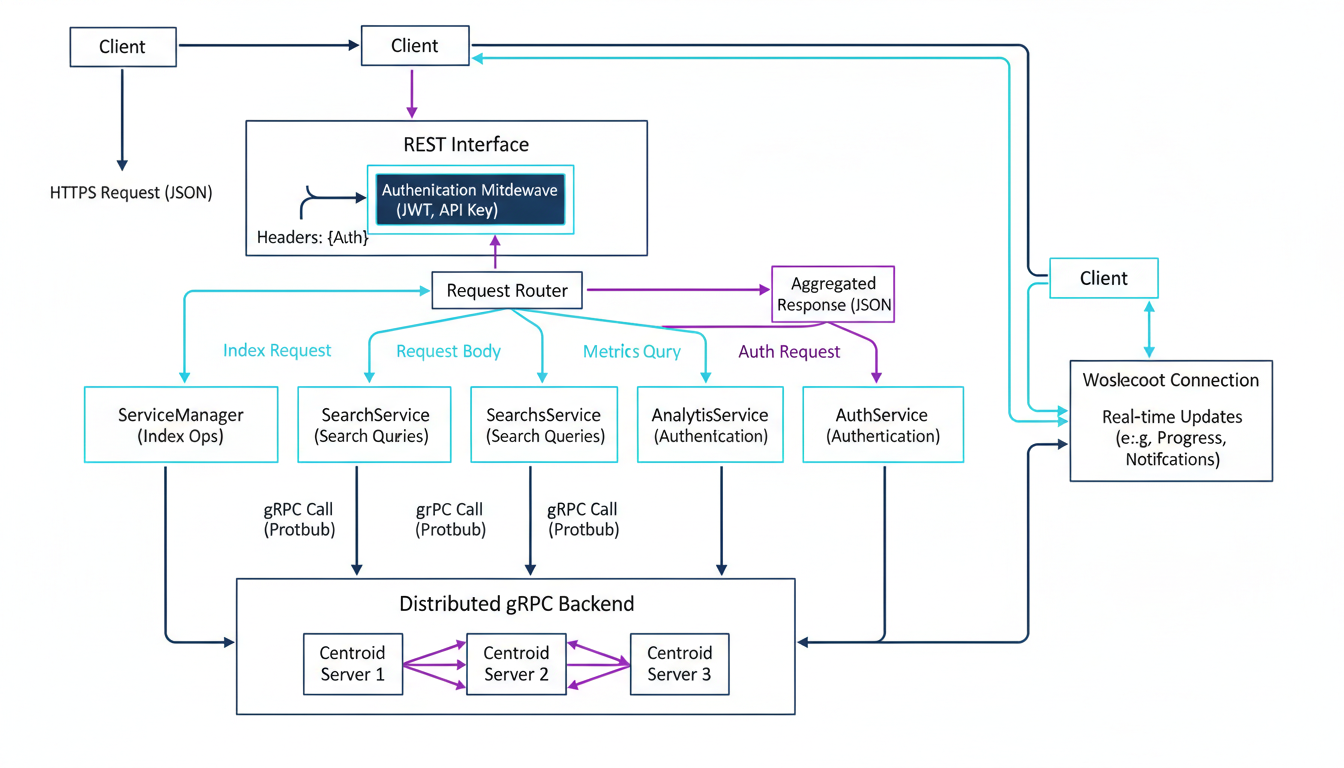
Every request flows through authentication middleware before reaching the service layer, which coordinates with distributed centroid servers for vector operations.
Authentication
JWT Tokens
Primary authentication method using JSON Web Tokens with automatic refresh.
// Login
POST /api/v1/auth/login
{
  "email": "user@example.com",
  "password": "secure_password"
}

// Response
{
  "access_token": "eyJhbGc...",
  "refresh_token": "eyJhbGc...",
  "expires_in": 3600
}

// Use token in requests
Authorization: Bearer eyJhbGc...
API Keys
Long-lived credentials for server-to-server integration and automation.
// Create API Key
POST /api/v1/auth/api-keys
{
  "name": "production-app",
  "expires_in": 2592000
}

// Response
{
  "key": "mlg_sk_live_...",
  "key_id": "key_abc123"
}

// Use in requests
x-api-key: mlg_sk_live_...
Token Refresh Flow
Access tokens expire after 1 hour. Use refresh tokens to get new access tokens without re-authentication:
POST /api/v1/auth/refresh
{
  "refresh_token": "eyJhbGc..."
}

// Response: new access token
{
  "access_token": "eyJhbGc...",
  "expires_in": 3600
}
REST API Reference
Index Management
/api/v1/indicesCreate a new vector index
View Example
// Request
{
  "index_id": "products-v1",
  "dimension": 768,
  "index_type": "IVFFlat",
  "num_centroids": 100,
  "metric_type": "L2"
}

// Response
{
  "success": true,
  "index_id": "products-v1",
  "status": "created"
}/api/v1/indicesList all indices
View Example
// Response
{
  "indices": [
    {
      "index_id": "products-v1",
      "dimension": 768,
      "num_vectors": 1000000,
      "size_bytes": 3145728000,
      "status": "ready"
    }
  ],
  "total_count": 1
}/api/v1/indices/:idGet detailed information about a specific index
/api/v1/indices/:idDelete an index and all associated data
Vector Operations
/api/v1/vectorsAdd vectors to an index
View Example
// Request
{
  "index_id": "products-v1",
  "vectors": [
    {
      "id": 1,
      "values": [0.1, 0.2, ..., 0.768],
      "metadata": {
        "product_id": "prod_123",
        "category": "electronics"
      }
    }
  ]
}

// Response
{
  "success": true,
  "vectors_added": 1,
  "failed_ids": []
}/api/v1/indices/:id/trainTrain an index with training data
View Example
// Request
{
  "data_source": "s3://bucket/training.parquet",
  "data_format": "parquet",
  "num_train_vectors": 100000,
  "async": true
}

// Response
{
  "success": true,
  "job_id": "train_abc123",
  "vectors_processed": 0,
  "status": "pending"
}/api/v1/vectorsDelete vectors by ID
View Example
// Request
{
  "index_id": "products-v1",
  "vector_ids": [1, 2, 3, 4, 5]
}

// Response
{
  "success": true,
  "vectors_deleted": 5,
  "not_found_ids": []
}
Search Operations
/api/v1/searchSearch for similar vectors (single query)
View Example
// Request
{
  "index_id": "products-v1",
  "query_vector": [0.1, 0.2, ..., 0.768],
  "k": 10,
  "nprobe": 4,
  "filters": {
    "category": "electronics"
  },
  "include_metadata": true
}

// Response
{
  "success": true,
  "results": [
    {
      "id": 42,
      "distance": 0.123,
      "metadata": {
        "product_id": "prod_456",
        "category": "electronics"
      }
    }
  ],
  "search_time_ms": 12.5
}/api/v1/batch-searchSearch with multiple queries simultaneously
View Example
// Request
{
  "index_id": "products-v1",
  "queries": [
    {"query_vector": [0.1, ...], "k": 10},
    {"query_vector": [0.2, ...], "k": 10}
  ]
}

// Response
{
  "success": true,
  "results": [
    { "results": [...], "search_time_ms": 10.2 },
    { "results": [...], "search_time_ms": 11.3 }
  ],
  "total_time_ms": 23.1
}
Search Parameters Explained
k: Number of nearest neighbors to returnnprobe: Number of clusters to search (higher = more accurate, slower)filters: Metadata filters to narrow resultsradius: Maximum distance for range search (-1 to disable)
Analytics & Monitoring
/api/v1/analytics/dashboardGet analytics overview with key metrics
/api/v1/analytics/system-metricsGet real-time system metrics (CPU, memory, storage)
View Example
// Response
{
  "timestamp": "2025-12-21T02:38:00Z",
  "cpu": {
    "usage_percent": 45.2,
    "cores": 16
  },
  "memory": {
    "used_bytes": 12884901888,
    "total_bytes": 34359738368,
    "usage_percent": 37.5
  },
  "storage": {
    "used_bytes": 549755813888,
    "total_bytes": 1099511627776,
    "usage_percent": 50.0
  }
}/api/v1/analytics/query-metricsGet query performance metrics and statistics
/api/v1/analytics/exportExport analytics data in CSV, JSON, or Excel format
Organization Management
/api/v1/organizationsList all organizations for authenticated user
/api/v1/organizationsCreate a new organization
View Example
// Request
{
  "name": "Acme Corporation",
  "description": "Vector search for product catalog",
  "settings": {
    "max_indices": 100,
    "max_vectors": 10000000
  }
}

// Response
{
  "id": "org_abc123",
  "name": "Acme Corporation",
  "created_at": "2025-12-21T02:38:00Z"
}/api/v1/organizations/:idUpdate organization settings
/api/v1/organizations/:id/members/inviteInvite a member to the organization
/api/v1/organizations/:id/quotasGet resource quotas and usage for organization
gRPC API Reference
Why gRPC?
gRPC provides significant performance benefits for high-throughput vector operations:
- • Binary protocol (Protocol Buffers) - 5-10x smaller payloads than JSON
- • HTTP/2 multiplexing - multiple requests over single connection
- • Streaming support - efficient for large batch operations
- • Strongly typed schemas - compile-time validation
MLGraphDaemon Service
Main daemon service for index management and vector operations.
CreateIndex(CreateIndexRequest) → CreateIndexResponseCreate a new vector index with specified configuration
TrainIndex(TrainIndexRequest) → TrainIndexResponseTrain index with training data (supports async)
StreamTrainIndex(stream TrainDataChunk) → TrainIndexResponseStream training data in chunks for large datasets
Search(SearchRequest) → SearchResponsePerform vector similarity search
StreamSearch(stream SearchRequest) → stream SearchResponseBidirectional streaming for real-time search
View Proto Definition
service MLGraphDaemon {
  rpc CreateIndex(CreateIndexRequest) returns (CreateIndexResponse);
  rpc DeleteIndex(DeleteIndexRequest) returns (DeleteIndexResponse);
  rpc ListIndices(ListIndicesRequest) returns (ListIndicesResponse);
  rpc TrainIndex(TrainIndexRequest) returns (TrainIndexResponse);
  rpc StreamTrainIndex(stream TrainDataChunk) returns (TrainIndexResponse);
  rpc AddVectors(AddVectorsRequest) returns (AddVectorsResponse);
  rpc Search(SearchRequest) returns (SearchResponse);
  rpc BatchSearch(BatchSearchRequest) returns (BatchSearchResponse);
  rpc StreamSearch(stream SearchRequest) returns (stream SearchResponse);
  rpc HealthCheck(HealthCheckRequest) returns (HealthCheckResponse);
}
CentroidService
Low-level service for managing individual centroid servers. Each centroid server hosts a subset of the vector space.
Initialize(InitializeRequest) → InitializeResponseInitialize centroid server with index configurations
AddVectors(AddVectorsRequest) → AddVectorsResponseAdd vectors to specific centroid
Search(SearchRequest) → SearchResponseSearch within specific centroid
GetCentroidMetadata(GetCentroidMetadataRequest) → GetCentroidMetadataResponseGet metadata for centroid transfer/replication
GetCentroidDataChunk(GetCentroidDataChunkRequest) → GetCentroidDataChunkResponseStream centroid data in chunks for transfer
Multi-Centroid Architecture
Each index can have multiple centroids identified by centroid_id. Vectors are assigned to centroids based on distance to centroid vectors. This enables horizontal scaling across multiple servers.
DistributedCentroidService
High-level service coordinating operations across multiple centroid servers.
CreateDistributedIndex(CreateDistributedIndexRequest) → CreateDistributedIndexResponseCreate index distributed across multiple centroid servers
AddVectorsToDistributedIndex(AddVectorsToDistributedIndexRequest) → AddVectorsToDistributedIndexResponseAdd vectors with automatic centroid assignment
SearchDistributedIndex(SearchDistributedIndexRequest) → SearchDistributedIndexResponseSearch across top-k centroids and aggregate results
GetSystemStatus(SystemStatusRequest) → SystemStatusResponseGet health status of all centroid servers
GetIndexSizeInfo(IndexSizeInfoRequest) → IndexSizeInfoResponseGet detailed size information across all centroids
View Search Example
// SearchDistributedIndexRequest
{
  index_id: "products-v1"
  query: [0.1, 0.2, ..., 0.768]
  top_k_centroids: 3      // Search top 3 closest centroids
  limit: 10               // Return 10 results per centroid
  nprobe: 4               // IVF parameter
}

// SearchDistributedIndexResponse
{
  success: true
  result_ids: [42, 17, 99, 23, ...]
  result_distances: [0.12, 0.15, 0.18, ...]
  source_centroids: [0, 2, 0, 1, ...]  // Which centroid each result came from
}
Error Handling
HTTP Status Codes
200 OKRequest succeeded201 CreatedResource created400 Bad RequestInvalid request401 UnauthorizedMissing/invalid auth403 ForbiddenInsufficient permissions404 Not FoundResource not found429 Too Many RequestsRate limit exceeded500 Internal ErrorServer errorError Response Format
{
  "error": {
    "code": "INVALID_DIMENSION",
    "message": "Vector dimension mismatch",
    "details": {
      "expected": 768,
      "received": 512,
      "index_id": "products-v1"
    },
    "request_id": "req_abc123"
  }
}
All error responses include a machine-readable error code, human-readable message, optional details object, and request ID for debugging.
Rate Limiting
MLGraph implements token bucket rate limiting to ensure fair resource usage. Rate limits are applied per API key or user.
Rate Limit Headers
X-RateLimit-Limit: Maximum requests per windowX-RateLimit-Remaining: Requests remaining in current windowX-RateLimit-Reset: Unix timestamp when limit resetsWebSocket API
WebSocket connections provide real-time updates for training jobs, search operations, and system metrics.
Connection
ws://localhost:8080/ws?token=<jwt_token>

// Or with API key
ws://localhost:8080/ws?api_key=mlg_sk_live_...
Subscribe to Updates
// Client sends
{
  "type": "subscribe",
  "channel": "training:job_abc123"
}

// Server sends updates
{
  "type": "update",
  "channel": "training:job_abc123",
  "data": {
    "status": "running",
    "progress": 0.45,
    "vectors_processed": 45000
  }
}
Available Channels
training:<job_id>- Training job progressindex:<index_id>- Index status updatesmetrics:system- Real-time system metricssearch:<session_id>- Search result streaming
Client Libraries & Examples
Python REST Client
import requests

# Initialize client
base_url = "http://localhost:8080/api/v1"
headers = {
    "Authorization": f"Bearer {token}"
}

# Create index
response = requests.post(
    f"{base_url}/indices",
    headers=headers,
    json={
        "index_id": "my-index",
        "dimension": 768,
        "index_type": "IVFFlat",
        "num_centroids": 100
    }
)

# Add vectors
vectors = generate_vectors(1000, 768)
requests.post(
    f"{base_url}/vectors",
    headers=headers,
    json={
        "index_id": "my-index",
        "vectors": vectors
    }
)

# Search
results = requests.post(
    f"{base_url}/search",
    headers=headers,
    json={
        "index_id": "my-index",
        "query_vector": query,
        "k": 10
    }
).json()
Python gRPC Client
import grpc
from mlgraph_pb2 import *
from mlgraph_pb2_grpc import *

# Connect to server
channel = grpc.insecure_channel(
    'localhost:50051'
)
stub = MLGraphDaemonStub(channel)

# Create index
request = CreateIndexRequest(
    config=IndexConfig(
        index_id="my-index",
        dimension=768,
        index_type="IVFFlat",
        num_centroids=100
    )
)
response = stub.CreateIndex(request)

# Stream search
def search_stream():
    for query in queries:
        yield SearchRequest(
            index_id="my-index",
            query_vector=query,
            k=10
        )

for result in stub.StreamSearch(
    search_stream()
):
    print(f"Found {len(result.results)}")
Node.js REST Client
const axios = require('axios');

const client = axios.create({
  baseURL: 'http://localhost:8080/api/v1',
  headers: {
    'Authorization': `Bearer ${token}`
  }
});

// Create index
await client.post('/indices', {
  index_id: 'my-index',
  dimension: 768,
  index_type: 'IVFFlat',
  num_centroids: 100
});

// Search
const { data } = await client.post('/search', {
  index_id: 'my-index',
  query_vector: queryVector,
  k: 10,
  include_metadata: true
});

console.log(`Found ${data.results.length}`);
cURL Examples
# Login
curl -X POST http://localhost:8080/api/v1/auth/login \
  -H "Content-Type: application/json" \
  -d '{"email":"user@example.com","password":"pass"}'

# Create index
curl -X POST http://localhost:8080/api/v1/indices \
  -H "Authorization: Bearer $TOKEN" \
  -H "Content-Type: application/json" \
  -d '{"index_id":"my-index","dimension":768}'

# Search
curl -X POST http://localhost:8080/api/v1/search \
  -H "Authorization: Bearer $TOKEN" \
  -H "Content-Type: application/json" \
  -d '{"index_id":"my-index","query_vector":[...],"k":10}'